Case studyConsumer healthcareMobile-first
Making healthcare search actually work.
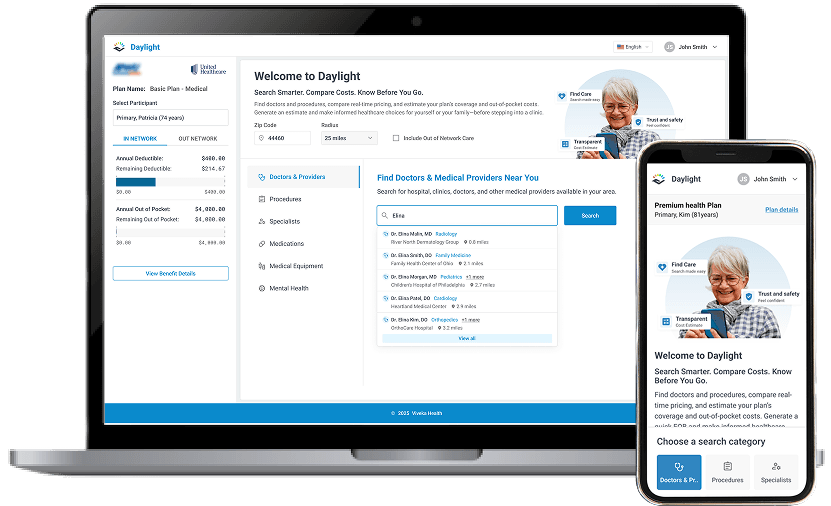
Redesigning a Find Care portal for members who don't speak in medical codes — they speak in “my knee hurts.” Category-first navigation, AI assistance for the uncertain, mobile-first throughout.
Challenge
A keyword-based search that required members to know medical terminology they don't have — leading to frustration, abandonment, and poor access to care.
My role
Senior Product Designer. Led the redesign end-to-end — research synthesis, information architecture, interaction design, accessibility, and responsive implementation.
Outcome
A category-first portal with AI assistance for uncertain users, full WCAG 2.1 AA compliance, and a mobile experience that matches how members actually use it.
Context
A portal that assumed users knew what they were looking for.
The Find Care portal helps members enrolled in employer-sponsored health plans find care, understand coverage, and manage their benefits. It's one of the most-used features on the platform — and used to be one of the most frustrating.
The existing design leaned heavily on keyword search. That works great if you're a healthcare professional looking up a specific CPT code. It works poorly if you're a person who just found out your knee hurts and needs to know who to see and what it's going to cost.
Research confirmed what the bounce rates already suggested: most members didn't know what to search for. They were typing the problem, not the procedure. The interface was answering a question they hadn't asked.
The insight
One observation that changed everything.
The core finding
Members don't want to search. They want to find.
Search implies you know what you're looking for. Most members didn't. They had a concern (“my knee hurts”), not a query (“orthopedic consultation, CPT 99243”). The interface had to meet them where they were — not where the data structure expected them to be.
That reframing was the whole case study. Everything else followed from it: category-based navigation instead of a keyword-first search. A conversational assistant for members who genuinely didn't know where to start. Cost estimates surfaced before booking, not buried after.
Design moves
Three changes that followed from the insight.
Categories first, search second.
Browse-by-category became the primary path — organized around how members talk about their needs, not how data is structured in the back end. Keyword search is still there for members who want it, just not in the driver's seat anymore.
An assistant for the uncertain.
Some members don't have the vocabulary to start. A conversational Find Care assistant handles the “I don't know where to begin” cases — asking questions in plain language and steering members toward the right care path, with costs and coverage visible along the way.
Mobile-first, not mobile-also.
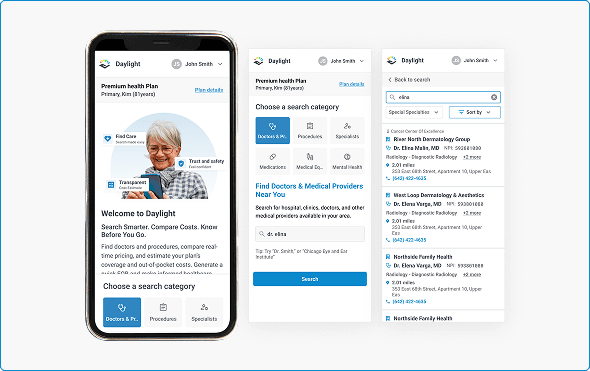
More than 70% of members were already using the portal on mobile. The existing design was desktop-first, shoehorned down. The redesign started from the phone — touch targets sized for thumbs, bottom navigation for one-handed use, collapsible filters that don't block content.
Responsive design
Rebuilt mobile-first, for how members actually use it.
The original Daylight platform wasn't optimized for mobile devices — creating significant usability issues for members accessing healthcare information on the go. The team prioritized mobile-first design principles, and I redesigned the entire mobile experience to ensure seamless functionality across all device sizes.
Outcome
What changed, qualitatively.
Fewer dead-end searches.
Category-based navigation reduced search abandonment. Members who previously hit empty results now land on a path forward — one they didn't have to guess at.
WCAG 2.1 AA across the flow.
Accessibility gaps in the old portal — contrast, screen reader support, focus management — were systematically resolved. Every flow in the redesign passes AA.
Mobile experience that matches mobile usage.
With most members on phones, the redesign treated mobile as the primary surface. Touch targets, thumb-zone primary actions, and bottom-sheet filters replaced the old desktop-first compromise.
A reusable component library.
The work also produced a component library — search bars, provider cards, cost-estimation patterns, filter controls — reused across adjacent features and modules.
Reflection
Designing for low technical literacy.
The instinct when users are struggling is to simplify by removing features. The better approach is usually the opposite: provide multiple paths to the same destination. Category browsing, keyword search, and the assistant all lead members to care options — they just let different users arrive by different routes.
Transparency also matters more than I expected going in. When members can see exactly what they'll pay before booking, they're more likely to seek care at all. Hidden costs create anxiety. Visible costs create confidence. That single pattern applied across the flow quietly did more for member experience than any individual interaction.